bitlightlabs
Setup local development environment for bitcoin regtest
Introduction
A ready-to-use Bitcoin regtest environment required for testing the open-source RGB project by BitLight, featuring:
- Deep integration of the Esplora UI browser built into version v0.11
- A descriptor address generation tool required for the RGB CLI
- A Bitcoin wallet faucet tool
Prerequisites
- Docker
- Docker Compose
- Make
Getting Started
- Close repo bitlightlabs/bitlight-local-env-public
- check the
.envfile and change the values if needed - Run
make startormake upto start the development environment - Run
curl localhost:3002to see the Esplora API running - Run
make testto run the tests - Open the
http://localhost:5002in your browser to see the Esplora UI
$ curl -s localhost:3002/mempool | jq
{
  "count": 0,
  "vsize": 0,
  "total_fee": 0,
  "fee_histogram": []
}
For more information about the Esplora API, check the Esplora API documentation
Commands
make start- Start the development environment with full logsmake up- Start the development environmentmake down- Stop the development environmentmake restart- Restart the development environmentmake clean- Remove all the containers and volumesmake recreate- Recreate the development environmentmake logs- Show the logs of the development environmentmake full-logs- Show the logs of the development environment with full logsmake cliormake core-cli- Run a bash shell inside the bitcoin-core containermake alice-cli- Run a bkd-cli repl inside the Alice Wallet container-
make bob-cli- Run a bkd-cli repl inside the Bob Wallet container make up-lnd- Start the LND containers: Alice, Bobmake down-lnd- Stop the LND containers
For manual run tests:
make activate- Get environment variables and activate them
Other commands are available, check the
Makefilefor more information
CLI Commands
Run make cli to enter the bitcoin-core container. The following commands are available:
Custom commands
In the bitcoin-core container, the following commands are available (they are just bash scripts in the docker/bitcoin/cli/bin folder):
load_wallet- Load the default minter wallet and show address and balancemint <blocks_number>- Mint <blocks_number> blocks to the default walletsend <address> <amount>- Send <amount> to <address> from the default wallet
The default wallet is
wallet, and used for minting and sending BTC. You can create your own commands by adding a new bash script in thedocker/bitcoin/cli/binfolder
Wallets
In Example, we have two wallets: Alice and Bob. You can use the following commands to interact with the wallets:
make alice-cli- Run a bkd-cli repl inside the Alice Wallet containermake bob-cli- Run a bkd-cli repl inside the Bob Wallet container
If you want to add new wallets,
- you can refer to the
docker-compose.ymlfile and add a new wallet service with service namewallet-<wallet_name>. - run
make upto start the new wallet. - run
make wallet-<wallet_name>-clito enter the new wallet container.
Examples
Create A new wallet Alice and send 25 BTC to Alice’s address
Run make alice-cli to enter the Alice Wallet container and chose the descriptor to start the REPL.
Please choose a descriptor to start the REPL:
 - (9) RGB Descriptor 9/*: tr(tprv8ZgxMBicQKsPeHzjP5LTL818LxwHbJNLZRa98Qdnn7M98fW15365cB1Sz9QZvYufASRKH6JEPhfpxVuFTKMHxDcEAVboqKuZdMmxzKVhMnW/86'/1'/0'/9/*)
 - (90) RGB Descriptor 9/0: tr(tprv8ZgxMBicQKsPeHzjP5LTL818LxwHbJNLZRa98Qdnn7M98fW15365cB1Sz9QZvYufASRKH6JEPhfpxVuFTKMHxDcEAVboqKuZdMmxzKVhMnW/86'/1'/0'/9/0)
 - (00) Bitcoin Descriptor 0/0: tr(tprv8ZgxMBicQKsPeHzjP5LTL818LxwHbJNLZRa98Qdnn7M98fW15365cB1Sz9QZvYufASRKH6JEPhfpxVuFTKMHxDcEAVboqKuZdMmxzKVhMnW/86'/1'/0'/0/0)
 - (*) quit
Enter your choice: 9 <== choose 9 for RGB Descriptor 9/*
Now, you can use the wallet object to interact with the wallet, for example:
wallet sync
wallet get_balance
wallet list_unspent
wallet get_new_address
The output should be similar to the following:
$ make alice-cli
docker-compose -p bitlight-local-env exec -it  wallet-alice /start-wallet.sh repl
Starting wallet...
Wallet Name: alice
Network             :  regtest
Wallet Name         :  alice
Fingerprint         :  5183a8d8
Root XPRV           :  tprv8ZgxMBicQKsPeHzjP5LTL818LxwHbJNLZRa98Qdnn7M98fW15365cB1Sz9QZvYufASRKH6JEPhfpxVuFTKMHxDcEAVboqKuZdMmxzKVhMnW
XPUB                :  [5183a8d8/86'/1'/0']tpubDDtdVYn7LWnWNUXADgoLGu48aLH4dZ17hYfRfV9rjB7QQK3BrphnrSV6pGAeyfyiAM7DmXPJgRzGoBdwWvRoFdJoMVpWfmM9FCk8ojVhbMS/*
Fixed XPUB          :  [5183a8d8/86'/1'/0']tpubDDtdVYn7LWnWNUXADgoLGu48aLH4dZ17hYfRfV9rjB7QQK3BrphnrSV6pGAeyfyiAM7DmXPJgRzGoBdwWvRoFdJoMVpWfmM9FCk8ojVhbMS/<0;1;9;10>/*
RGB Descriptor 9/0  :  tr(tprv8ZgxMBicQKsPeHzjP5LTL818LxwHbJNLZRa98Qdnn7M98fW15365cB1Sz9QZvYufASRKH6JEPhfpxVuFTKMHxDcEAVboqKuZdMmxzKVhMnW/86'/1'/0'/9/0)
RGB Address         :  bcrt1pr3rupmav8a7av7dqfyvynu2wk02lduggnh9ln4ndze9aqvuv9y3sklwrss
RGB Descriptor 9/*  :  tr(tprv8ZgxMBicQKsPeHzjP5LTL818LxwHbJNLZRa98Qdnn7M98fW15365cB1Sz9QZvYufASRKH6JEPhfpxVuFTKMHxDcEAVboqKuZdMmxzKVhMnW/86'/1'/0'/9/*)
Bitcoin Descriptor 0/0:  tr(tprv8ZgxMBicQKsPeHzjP5LTL818LxwHbJNLZRa98Qdnn7M98fW15365cB1Sz9QZvYufASRKH6JEPhfpxVuFTKMHxDcEAVboqKuZdMmxzKVhMnW/86'/1'/0'/0/0)
Bitcoin Address     :  bcrt1pn0s2pajhsw38fnpgcj79w3kr3c0r89y3xyekjt8qaudje70g4shs20nwfx
Balance             :  0
Wallet is ready
Please choose a descriptor to start the REPL:
 - (9) RGB Descriptor 9/*: tr(tprv8ZgxMBicQKsPeHzjP5LTL818LxwHbJNLZRa98Qdnn7M98fW15365cB1Sz9QZvYufASRKH6JEPhfpxVuFTKMHxDcEAVboqKuZdMmxzKVhMnW/86'/1'/0'/9/*)
 - (90) RGB Descriptor 9/0: tr(tprv8ZgxMBicQKsPeHzjP5LTL818LxwHbJNLZRa98Qdnn7M98fW15365cB1Sz9QZvYufASRKH6JEPhfpxVuFTKMHxDcEAVboqKuZdMmxzKVhMnW/86'/1'/0'/9/0)
 - (00) Bitcoin Descriptor 0/0: tr(tprv8ZgxMBicQKsPeHzjP5LTL818LxwHbJNLZRa98Qdnn7M98fW15365cB1Sz9QZvYufASRKH6JEPhfpxVuFTKMHxDcEAVboqKuZdMmxzKVhMnW/86'/1'/0'/0/0)
 - (*) quit
Enter your choice: 9
Starting REPL with descriptor tr(tprv8ZgxMBicQKsPeHzjP5LTL818LxwHbJNLZRa98Qdnn7M98fW15365cB1Sz9QZvYufASRKH6JEPhfpxVuFTKMHxDcEAVboqKuZdMmxzKVhMnW/86'/1'/0'/9/*)
use 'wallet' to interact with the wallet of alice
use 'help' to see available commands
Available commands:
  wallet sync
  wallet get_balance
  wallet get_new_address
  wallet list_unspent
Press Ctrl+D to exit
>>
In the output, you can see the base information about the wallet, such as the XPUB, RGB Address, and Balance.
Now you can use the wallet object to interact with the wallet, for example:
>> wallet sync
{}
>> wallet get_balance
{
  "satoshi": {
    "confirmed": 0,
    "immature": 0,
    "trusted_pending": 0,
    "untrusted_pending": 0
  }
}
>> wallet list_unspent
[]
>> wallet get_new_address
{
  "address": "bcrt1pr3rupmav8a7av7dqfyvynu2wk02lduggnh9ln4ndze9aqvuv9y3sklwrss"   <== Alice's address used to receive BTC
}
>>
Remember the address bcrt1pr3rupmav8a7av7dqfyvynu2wk02lduggnh9ln4ndze9aqvuv9y3sklwrss for the next step.
Now, let’s send 25 BTC to Alice’s address.
Open a new terminal and run make core-cli to enter the bitcoin-core container, and run following commands:
load_wallet
send bcrt1pr3rupmav8a7av7dqfyvynu2wk02lduggnh9ln4ndze9aqvuv9y3sklwrss 25
mint 1
The output should be similar to the following:
$ make core-cli
docker-compose -p bitlight-local-env exec -it -w /cli bitcoin-core /cli/active.sh
/cli $ load_wallet
load wallet's address: bcrt1qv6428v9lzk9ac5aswp4hlaf773r48824stfvx9 with balance: 50.00000000
/cli $ send bcrt1pr3rupmav8a7av7dqfyvynu2wk02lduggnh9ln4ndze9aqvuv9y3sklwrss 25
load wallet's address: bcrt1qx4mwpxpw0d8prsrw4fg8q2s94au6s2qk5dwc9g with balance: 50.00000000
9b2eca8ba85f2e11e97c820bfc5990a20387812f313cea6e8889c309ed8bff45
Sent 25 to bcrt1pr3rupmav8a7av7dqfyvynu2wk02lduggnh9ln4ndze9aqvuv9y3sklwrss
/cli $ mint 1
load wallet's address: bcrt1q2rtzrwrlpjnknsct2re3ez595wx2c9ezmspacl with balance: 24.99996940
[
  "13b179e2d1735e9dce6d5eb5f4b6272d354db2fa062abd66d2e8f08e63adb20f"
]
/cli $
Now, open http://localhost:5002/tx/recent in your browser, you should see the transaction with 25 BTC sent to Alice’s address, open it, and you will see the transaction details.
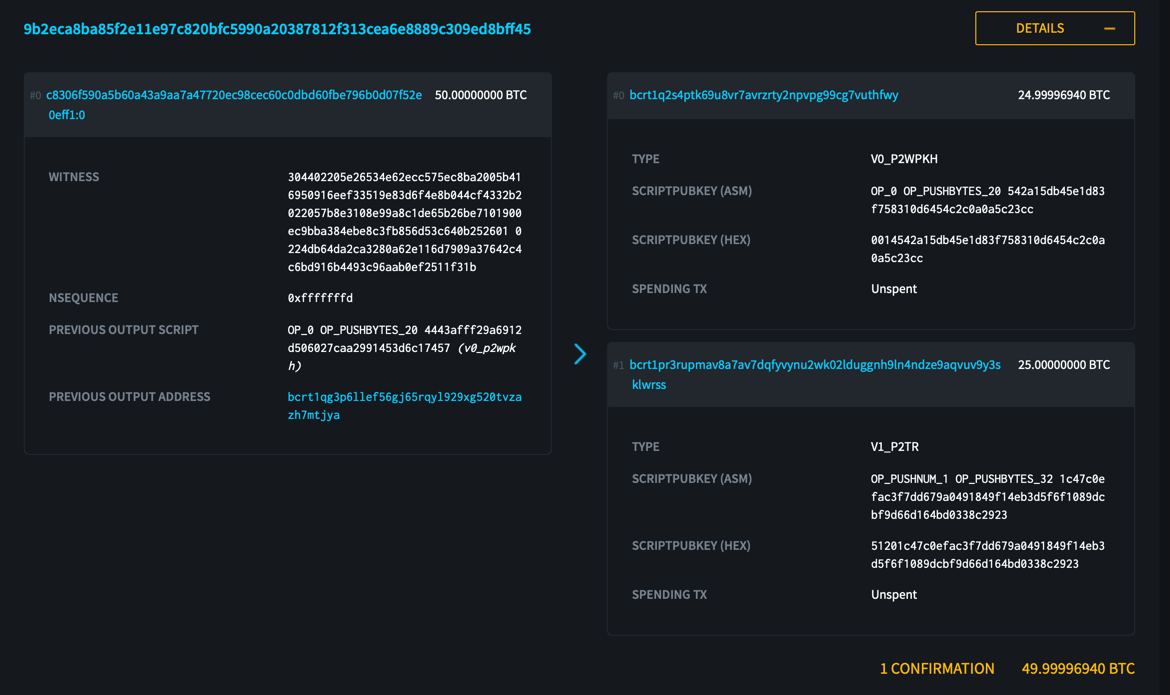
Now, let’s check the balance of Alice’s wallet by running make alice-cli or go back to the previous terminal, and run the following commands:
wallet sync
wallet get_balance
wallet list_unspent
The output should be similar to the following:
$ make alice-cli
docker-compose -p bitlight-local-env exec -it  wallet-alice /start-wallet.sh repl
Starting wallet...
Wallet Name: alice
Network             :  regtest
Wallet Name         :  alice
Fingerprint         :  5183a8d8
Root XPRV           :  tprv8ZgxMBicQKsPeHzjP5LTL818LxwHbJNLZRa98Qdnn7M98fW15365cB1Sz9QZvYufASRKH6JEPhfpxVuFTKMHxDcEAVboqKuZdMmxzKVhMnW
XPUB                :  [5183a8d8/86'/1'/0']tpubDDtdVYn7LWnWNUXADgoLGu48aLH4dZ17hYfRfV9rjB7QQK3BrphnrSV6pGAeyfyiAM7DmXPJgRzGoBdwWvRoFdJoMVpWfmM9FCk8ojVhbMS/*
Fixed XPUB          :  [5183a8d8/86'/1'/0']tpubDDtdVYn7LWnWNUXADgoLGu48aLH4dZ17hYfRfV9rjB7QQK3BrphnrSV6pGAeyfyiAM7DmXPJgRzGoBdwWvRoFdJoMVpWfmM9FCk8ojVhbMS/<0;1;9;10>/*
RGB Descriptor 9/0  :  tr(tprv8ZgxMBicQKsPeHzjP5LTL818LxwHbJNLZRa98Qdnn7M98fW15365cB1Sz9QZvYufASRKH6JEPhfpxVuFTKMHxDcEAVboqKuZdMmxzKVhMnW/86'/1'/0'/9/0)
RGB Address         :  bcrt1pr3rupmav8a7av7dqfyvynu2wk02lduggnh9ln4ndze9aqvuv9y3sklwrss
RGB Descriptor 9/*  :  tr(tprv8ZgxMBicQKsPeHzjP5LTL818LxwHbJNLZRa98Qdnn7M98fW15365cB1Sz9QZvYufASRKH6JEPhfpxVuFTKMHxDcEAVboqKuZdMmxzKVhMnW/86'/1'/0'/9/*)
Bitcoin Descriptor 0/0:  tr(tprv8ZgxMBicQKsPeHzjP5LTL818LxwHbJNLZRa98Qdnn7M98fW15365cB1Sz9QZvYufASRKH6JEPhfpxVuFTKMHxDcEAVboqKuZdMmxzKVhMnW/86'/1'/0'/0/0)
Bitcoin Address     :  bcrt1pn0s2pajhsw38fnpgcj79w3kr3c0r89y3xyekjt8qaudje70g4shs20nwfx
Balance             :  2500000000
Wallet is ready
Please choose a descriptor to start the REPL:
 - (9) RGB Descriptor 9/*: tr(tprv8ZgxMBicQKsPeHzjP5LTL818LxwHbJNLZRa98Qdnn7M98fW15365cB1Sz9QZvYufASRKH6JEPhfpxVuFTKMHxDcEAVboqKuZdMmxzKVhMnW/86'/1'/0'/9/*)
 - (90) RGB Descriptor 9/0: tr(tprv8ZgxMBicQKsPeHzjP5LTL818LxwHbJNLZRa98Qdnn7M98fW15365cB1Sz9QZvYufASRKH6JEPhfpxVuFTKMHxDcEAVboqKuZdMmxzKVhMnW/86'/1'/0'/9/0)
 - (00) Bitcoin Descriptor 0/0: tr(tprv8ZgxMBicQKsPeHzjP5LTL818LxwHbJNLZRa98Qdnn7M98fW15365cB1Sz9QZvYufASRKH6JEPhfpxVuFTKMHxDcEAVboqKuZdMmxzKVhMnW/86'/1'/0'/0/0)
 - (*) quit
Enter your choice: 9  <== choose 9 for RGB Descriptor 9/*
Starting REPL with descriptor tr(tprv8ZgxMBicQKsPeHzjP5LTL818LxwHbJNLZRa98Qdnn7M98fW15365cB1Sz9QZvYufASRKH6JEPhfpxVuFTKMHxDcEAVboqKuZdMmxzKVhMnW/86'/1'/0'/9/*)
use 'wallet' to interact with the wallet of alice
use 'help' to see available commands
Available commands:
  wallet sync
  wallet get_balance
  wallet get_new_address
  wallet list_unspent
Press Ctrl+D to exit
>> wallet sync
{}
>> wallet get_balance
{
  "satoshi": {
    "confirmed": 2500000000,
    "immature": 0,
    "trusted_pending": 0,
    "untrusted_pending": 0
  }
}
>> wallet list_unspent
[
  {
    "is_spent": false,
    "keychain": "External",
    "outpoint": "9b2eca8ba85f2e11e97c820bfc5990a20387812f313cea6e8889c309ed8bff45:1",
    "txout": {
      "script_pubkey": "51201c47c0efac3f7dd679a0491849f14eb3d5f6f1089dcbf9d66d164bd0338c2923",
      "value": 2500000000
    }
  }
]
Now, you can see the balance of Alice’s wallet is 25 BTC, and the transaction is confirmed.
Bitcoin Core commands
bitcoin-cli -regtest getblockchaininfo- Get the blockchain informationbitcoin-cli -regtest getnewaddress- Get a new addressbitcoin-cli -regtest generatetoaddress 101 <address>- Generate 101 blocks to the addressbitcoin-cli -regtest getbalance- Get the balance of the wallet
There are more commands available. Run bitcoin-cli help to see all the available commands.
Configuration
The configuration is done via the .env file. The following variables are available:
API_PORT- The port for the Esplora APIRPC_USER- The username for the RPC serverRPC_PASSWORD- The password for the RPC server